Now Article Posting by Mails By Anyone

"Training Enhancers (A division of Network Enhancers - NETEN) now introduces anyone to post the artcles related to trainings, events, knowledge sharing, Technology advances of their respective domain in a simple way by mail to - trainingenhancers.blogpost@blogger.com"
All the articles will be reviewed manullay by the Moderator and if articles were found not relevant to the Blog, those articles will be removed.

/Training Enhancers Team
Showing posts with label Online Education. Show all posts

Friday, 3 May 2013

Register today for Virtual Cloud Day 2013 coming on 30 May 2013


If you are having trouble reading this email, read the online version.
Invitation to Attend Virtual Cloud Day 2013
VMware Virtual Cloud Day is here again!

Mark your calendar and register for the region's biggest and most comprehensive online event dedicated to virtualization, cloud computing, and end-user computing – VMware Virtual Cloud Day 2013 – on Thursday, 30 May 2013.

Join up to 15,000 IT practitioners across Asia-Pacific and Japan to learn about VMware's cloud and desktop solutions.


What's on this year?

This year, we will share how VMware's software-defined data center can transform the way IT is delivered by abstracting, pooling and automating all data center resources and services to:
Reduce CapEx by up to 30%1
Reduce application downtime by up to 36%2
Reduce diagnostics and problem resolution time by up to 26%2

We will also address the various cloud infrastructure management challenges faced by IT organizations, and explore the complexities of the fast growing trend – mobility at the workplace – through on-demand webcasts on:
Cloud computing and management.
Virtualizing your Tier 1 business critical applications.
Achieving Windows migration and modernization under one hour.
Empowering your new mobile workforce while ensuring highest security and manageability.


Highlights of the event

Keynote address by Pat Gelsinger, CEO, VMware.
Simplify and securely build your mobile workforce through our latest innovative solutions in end-user computing.
Visit our virtual booths to download resources and chat with VMware and partner experts on topics ranging from getting started with virtualization to cloud management.
Network with your peers at our networking lounge.

We look forward to seeing you at Virtual Cloud Day, where our experts will guide you on the next phase of your cloud journey.
Register now
Event Details

Date: 30 May 2013, Thursday
Time: 10:00am – 1:30pm (IST)
Venue: This is an online event.
You will be provided with a link and login details upon registration.


Register & Attend

Refer a Colleague and stand a chance to win a pair of Sennheiser Headphones.


Saturday, 23 March 2013

Learning the Basics of Citrix XenApp 5 for Windows Server 2008


Learning the basics of Citrix XenApp 5 for Windows Server 2008 is a fairly easy process. However, understanding all the installation options, configuration settings, management consoles and administrative processes for all the various Citrix software and hardware components that can go into a Citrix farm can be a daunting task. This series of articles will lead you from the very first step to the very last step of installing, configuring and testing XenApp 5 on a single server running Windows Server 2008. The goal – to get you installing and running a Published Application in the shortest amount of time.


Thursday, 14 March 2013

Online learning: Campus 2.0


When campus president Wallace Loh walked into Juan Uriagereka's office last August, he got right to the point. “We need courses for this thing — yesterday!”
Uriagereka, associate provost for faculty affairs at the University of Maryland in College Park, knew exactly what his boss meant. Campus administrators around the world had been buzzing for months about massive open online courses, or MOOCs: Internet-based teaching programmes designed to handle thousands of students simultaneously, in part using the tactics of social-networking websites. To supplement video lectures, much of the learning comes from online comments, questions and discussions. Participants even mark one another's tests.
MOOCs had exploded into the academic consciousness in summer 2011, when a free artificial-intelligence course offered by Stanford University in California attracted 160,000 students from around the world — 23,000 of whom finished it. Now, Coursera in Mountain View, California — one of the three researcher-led start-up companies actively developing MOOCs — was inviting the University of Maryland to submit up to five courses for broadcast on its software platform. Loh wanted in. “He was very clear,” says Uriagereka. “We needed to be a part of this.”
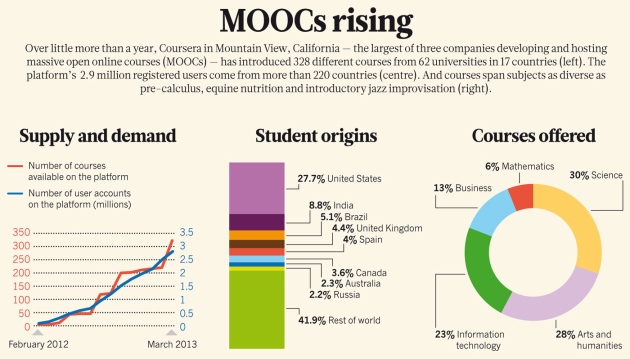
Similar conversations have been taking place at major universities around the world, as dozens — 74, at the last count — rush to sign up. Science, engineering and technology courses have been in the vanguard of the movement, but offerings in management, humanities and the arts are growing in popularity (see 'MOOCs rising'). “In 25 years of observing higher education, I've never seen anything move this fast,” says Mitchell Stevens, a sociologist at Stanford and one of the leaders of an ongoing, campus-wide discussion series known as Education's Digital Future.
The ferment is attributable in part to MOOCs hitting at exactly the right time. Bricks-and-mortar campuses are unlikely to keep up with the demand for advanced education: according to one widely quoted calculation, the world would have to construct more than four new 30,000-student universities per week to accommodate the children who will reach enrolment age by 2025 (seego.nature.com/mjuzhu), let alone the millions of adults looking for further education or career training. Colleges and universities are also under tremendous financial pressure, especially in the United States, where rocketing tuition fees and ever-expanding student debt have resulted in a backlash from politicians, parents and students demanding to know what their money is going towards.
When MOOCs came along, says Chris Dede, who studies educational technologies at Harvard University in Cambridge, Massachusetts, they promised to solve these problems by radically expanding the reach of existing campuses while streamlining the workload for educators — and universities seized on them as the next big thing.
There is reason to hope that this is a positive development, says Roy Pea, who heads a Stanford centre that studies how people use technology. MOOCs, which have incorporated decades of research on how students learn best, could free faculty members from the drudgery of repetitive introductory lectures. What's more, they can record online students' every mouse click, an ability that promises to transform education research by generating data that could improve teaching in the future. “We can have microanalytics on every paper, every test, right down to what media each student prefers,” says Pea.
MOOC companies still face challenges, such as dealing with low course-completion rates and proving that they can make profit. And they have a lot of convincing to do among faculty members, says Uriagereka. “Some salivate and can't wait to be a part of it,” he says, noting that his university had 20 volunteers for its 5 inaugural MOOCs. “Others say, 'Wait a minute. How do we preserve quality? How do we connect with students?'”

Large-scale pedagogy

MOOCs are largely a product of one corridor in the Stanford computer-science department, where the offices of Andrew Ng, Daphne Koller and Sebastian Thrun are just a few steps apart. But they are also the fruit of research dating back to at least the 1990s, when the explosive worldwide growth of the Internet inspired a multitude of efforts to exploit it for education. Campus administrators tended to regard such projects as a sideshow — the higher-education financial crunch was not quite as serious back then — so most experiments were the work of committed individuals, departments or research centres. But with the relentless advance of technologies such as broadband, social networking and smart phones, researchers' interest continued to grow.
Ng got involved in 2007 because he wanted to bring Stanford-quality teaching to “the people who would never be able to come to Stanford”, he says. Following a path blazed by the open-source software movement, and by earlier open-source education initiatives, he started a project to post online free lecture videos and handouts for ten of Stanford's most popular engineering courses. His approach was fairly crude, he admits: just record the lectures, put them online and hope for the best. But to his astonishment, strangers started coming up to him and saying, “Are you Professor Ng? I've been taking machine learning with you!” He began to grasp how far online courses could reach, and started working on a scaled-up version of his system. “When one professor can teach 50,000 people,” he says, “it alters the economics of education.”
One of the many people he talked to about his work was Koller, who began developing her own online-education system in 2009. Whereas Ng looked outwards, Koller wanted to look inwards and reform Stanford's teaching on-campus. She particularly wanted to promote 'flipping', a decade-old innovation in which students listen to lectures at home and do their 'homework' in class with their teachers, focusing on the most difficult aspects or discussing a concept's wider implications. This lets the instructors concentrate on the parts of teaching most of them enjoy — interacting with the students — and relieves them of the repetitive lecturing that they often dislike.
Koller also wanted to incorporate insights from the many studies showing that passively listening to a lecture is a terrible way to learn (F. I. M. Craik and R. S. Lockhart J. Verb. Learn. Verb. Behav. 11,671684; 1972). Following an approach pioneered by other online developers over the previous decade, Koller broke each video into 8–10-minute segments separated by pauses in which students have to answer questions or solve a problem. The idea was to get them to think about what they had learned; the deeper their engagement, studies showed, the better their retention.
Finally, to encourage greater interaction among the students themselves, Koller took a cue from social-networking sites such as Facebook and gave her system an online discussion forum. As Ng explains, the idea was to extend what happens in a face-to-face study group: “Students sit with their best friends, they work on problems together, they critique each others' solutions — lots of pedagogical studies show that these more interactive modes of student engagement result in better student learning.”
Koller and Ng eventually realized that they could achieve both their goals — outreach and on-campus reform — by pooling their efforts. In late 2010, they started work on a software platform that would support discussion forums, video feeds and all the other basic services of an online course, so that an instructor only had to provide the content. But making social interaction work on a large scale turned out to be a research project of its own, says Ng. For example, standard online discussion forums are a fine way to bring communities together — for 100 or so users. “With 100,000 it gets more complicated,” he says. Hundreds of students might end up asking the same question. So the developers implemented a real-time search algorithm that would display related questions and potential answers before a student could finish typing. Ng and Koller also let students vote items up or down, much like on the link-sharing website Reddit, so that the most insightful questions would rise to the top rather than being lost in the chatter.
The two researchers even set the system up so that students could mark one another's homework for essay questions, which computers can't yet handle. Not only is such a system essential to scaling up learning, says Koller, but it also turns out to be a valuable learning experience. And experiments have shown that if the criteria are spelled out clearly, grades given by the students correlate strongly with those given by the teacher (R. Robinson Am. Biol. Teach. 63, 474–480; 2001).
By early 2011, Ng and Koller were planning to demonstrate the platform on campus, and other faculty members were paying attention. Among them was Thrun, a robotics researcher who was splitting his time between Stanford and Google in Mountain View, where he worked on the development of driverless cars.
It was Thrun's idea to go big, using a platform of his own based in part on Ng and Koller's ideas. He says that he was scheduled to teach an artificial-intelligence course that autumn, along with Peter Norvig, Google's director of research, “and I thought it was a social responsibility to take it online, so we could reach more than the 200 students we would get at Stanford”. But even he hadn't imagined how big it would get. This was the course that registered 160,000 people from 195 countries after just one public announcement, a post to an artificial-intelligence mailing list. “It shocked everybody,” he says.
In response, Ng took Koller's machine-learning course public using their platform, while department chair Jennifer Widom did the same with a database course. Each attracted roughly 60,000 students. With those numbers, venture-capital funding quickly followed.
Thrun announced his company Udacity in January 2012. Arguing that most professors don't have a clue about how to exploit the online medium, he and his colleagues elected to develop their courses in-house, working with education experts to make the pedagogy as effective as possible.
Ng and Koller announced Coursera in April 2012, and took the opposite tack. They partnered with big-name universities — Stanford and three others, to start — and let them provide the content while Coursera provided the hosting and software platform.
Anant Agarwal, former head of the computer science and artificial-intelligence laboratory at MIT, had been experimenting with online learning for a decade, developing an electric-circuit simulation package called WebSim that tried to give online students an effective substitute for hands-on laboratory experience. In December 2011, inspired by goings on at Stanford, he launched MITx: an independent, not-for-profit company that would offer massive online courses from MIT on an open-source basis. It became edX in May 2012, when Harvard joined.
At the same time, the term MOOCs, which had been circulating quietly in educational circles since it was coined in 2008, took off. Media accounts boomed, and company principals were soon giving talks at the popular Technology, Entertainment and Design (TED) conferences and the annual meeting of the World Economic Forum in Davos, Switzerland. As Koller told one interviewer: “I can't believe my life!”

Learning curve

The MOOC companies can point to plenty of success stories. For example, the 7,200 students who completed Agarwal's electric-circuits MOOC in spring 2012 included an 81-year-old man, a single mother with two children, and a 15-year-old prodigy from Mongolia who got a perfect score on the final exam. Udacity's Introduction to Computer Science MOOC, currently its most popular, has enrolled more than 270,000 students.
But MOOCs have also had some teething problems. “Many people have no idea what they're in for when they commit to put a course online,” says John Mitchell, a computer scientist and Stanford's first vice-provost of online learning. “Restructuring even one lecture into short, self-contained segments takes a fair amount of thinking.” So does coming up with good, compelling questions to engage the students between the segments. Then there is the push for high-quality production, he says. “It takes many hours to produce one hour of quality video.”
More worrisome are the MOOCs' dismal completion rates, which rarely rise above 15%. Completion has been a problem for distance learning ever since the first correspondence courses in the nineteenth century, says Dede. Only a small fraction of students have the drive and the perseverance to learn on their own, he says, and most people need help: “social support from their fellow students to help them keep going, and intellectual support from their professors and fellow students to help them figure out the material”. At the moment, says Dede, the MOOC companies' peer-to-peer communication tools don't do nearly enough to provide that kind of help. “They're just kind of hoping that people will figure out from the bottom up how to support each other,” he says.
The companies acknowledge that completion rates are a concern and that their platforms are still works in progress. “My aspiration isn't to reach the 1% of the world that is self-motivating,” says Thrun, “it's to reach the other 99%.” The companies are already working on enhanced social tools such as live video and text chat, for example.
And to observers such as David Krakauer, that is as it should be. “There are two ways to make something new,” says Krakauer, a biologist who directs the Institute for Discovery at the University of Wisconsin–Madison. “You can design something that's perfect on paper, and then try to build it. Or you can start with a system that's rubbish, experiment and build a better one with feedback. That's the Silicon Valley style — but it's also the scientific way.”

Silicon valley style

A Silicon Valley sensibility permeates the three big MOOC firms. For example, they all subscribe to the open-source ideal. “Charging for content would be a tragedy,” says Ng. But they also see plenty of opportunities to make money using the 'freemium' model followed by Google and many other technology companies: give away the basic product to draw users, and then charge for premium add-ons.
One obvious add-on might be certification, says Ng. “You would get a certificate that verifies you took the course for a small fee like US$10–$30” — a potentially substantial revenue stream when enrolments are in six figures. In the future, the companies might also offer full university course credits for a fee; they are already working with accreditation agencies to arrange that.
Other possibilities include profiting from in-course mentoring services, career counselling — and charging universities for licensing. In October 2012, for example, edX licensed a circuit-theory MOOC designed by Agarwal to San Jose State University in California, where it was used as the online component of a flipped classroom experience. In return for the licensing fee, “the professors can offer the course on campus, tweak the course however they please, get access to students' grades and online activity, and all the analytics a teacher would want to see”, says Agarwal. In this particular experiment, he adds, the San Jose course's usual 40% failure rate fell to 9%.
Analytics are another example of the Silicon Valley style, potentially allowing the MOOC companies to do for education what Internet giants such as Google or Amazon have done for marketing. In Coursera's case, says Koller, the platform monitors the students' every mouse click — “quiz submissions, forum posts, when and where a student pauses a lecture video, or rewinds, or moves to 1.5 speed”.
The company is constantly using these data as feedback, says Koller, both for refining the platform's user interface and for improving the course content. If 90% of the students start stumbling over the review exercises for a certain lecture, for example, then maybe it is time to revise that lecture.
“But anything we do is just the tip of the iceberg,” says Koller. When data from individual students are multiplied by tens or hundreds of thousands of students per course, they reach a scale big enough to launch a whole new field of learning informatics — “big-data science for education”, Pea calls it.
Learning informatics could provide an unprecedented level of feedback for colleges and universities, says Stevens: “We haven't measured learning in higher education very often, very consistently or very well — ever.” Academics have endlessly studied factors that are associated with university enrolment and success, such as race, parental income and school achievement. They have also studied what happens after graduation: the higher earnings and other benefits that college confers, on average, over a lifetime.
“What we don't know is how college performs this magic,” says Stevens. “We certainly don't know the extent to which digitally mediated college experiences will deliver the same returns as a four-year residential experience.” Now, however, he and his colleagues can begin to see what education science will look like as it merges with data analytics. Instead of looking at aggregate data about students on average, for example, researchers can finally — with appropriate permissions and privacy safeguards — follow individual students throughout their university careers, measuring exactly how specific experiences and interactions affect their learning. “It's thrilling,” he says, “a huge intellectual frontier.”
What remains to be seen is how higher education will change in response to the new technology. Maybe not much, says Dede. Yes, the major universities will extend their courses beyond their own campuses; the MOOCs have already shown them that they can do so with relatively little effort and potentially large profits. But the MOOC founders' other goal — fundamental reform in on-campus teaching — is a much tougher proposition.
“Universities think of themselves as being in the university business, not the learning business,” explains Dede. That is, they mostly take their existing structures and practices as given, and look to MOOCs and other online technologies as a way to do things more cheaply. But experience with earlier innovations such as personal computing shows the limits of that approach, he says: real gains in the productivity and effectiveness of learning will not come until universities radically reshape those structures and practices to take full advantage of the technology.
No one knows exactly where that restructuring might end up. Lectures becoming a rarity, for example? Vast numbers of students getting their degrees entirely online? But the revolution has already begun, says Stevens. Major universities such as Stanford are taking the lead, “trying to integrate and embed digital learning into the fabric of the entire university” — and trying to master the new technology before it masters them.
Virtually everyone participating in this upheaval agrees on one thing. Colleges and universities will change — perhaps dramatically — but they will not disappear. “No one says that all education has to be online,” says Thrun. “Sometimes, a classroom is better.” Especially in communal endeavours such as science, “education is more than just knowledge”, says Dede. “It's abilities like leadership and collaboration, and traits like tenacity”, all of which are best learned face to face.
An unspoken irony weaves through almost every discussion about MOOCs: thanks to innovations such as flipping, online technology's most profound effect on education may be to make human interaction more important than ever. As Krakauer puts it, “what's absolutely clear is that the very large lecture hall can be completely replaced: there's no value added over watching it at home on an iPad screen with a cup of tea. But there is also no substitute for a conversation.”




Friday, 22 February 2013

Introducing uniRow version 2.0 (aka Seabiscuit)


We are glad to announce the release of uniRow version 2, which we have named Seabiscuit.
Fast, Agile and Trained to Win, the Seabiscuit was one of the most remarkable race horses despite its small size. uniRow Version 2 is named Seabiscuit in respect to the power and agility of this small, yet remarkable animal.

What is new ?

1. Faster Connectivity: uniRow Seabiscuit loads 3 times faster and is even lighter on your bandwidth. Our dynamic bandwidth detection ensures your experience doesn’t suffer in multi-party collaboration.
2. Smoother Collaboration Tools: uniRow collaboration is now on HTML5. This significantly improves interactivity and control during white-boarding, document sharing or polls. You can now switch between different collaboration types with the click of a button.
3. Redesigned Polls: We redesigned the polls to make sure you can test participant alertness and attentiveness quickly.
4. Integrated Toll-Free Dial In: Join a uniRow session with a computer or telephone. This allows your team members, customers and students to join from areas where Internet is a challenge. Toll Free dial-in numbers are available for more than 30 countries. If you wish to know more about it, please contact our sales team (sales@unirow.com or +1-650-318-3852)
5. Instant Participant Feedback: Participants can give instant feedback or request the presenter to go slow, repeat or speed up. All this, with the click of a button.
Instant Feedback
6. Play Recordings on Tablets or Mobile devices: We ensure all your previous sessions are retained for reference and reuse. Now we went a step further and have added support for recording playback on any smartphone or tablet device.
7. Faster Screen Sharing: Screen Sharing is now faster and consumes lesser bandwidth. See the screen sharing preview and receive chat messages while you are away from your uniRow window.
8. Improved API and Integration: Our API allows you to integrate the uniRow experience within your website or application. It is not just single sign on. We ensure the uniRow experience is delivered within your product. For more details on API and integration, write to us on api@unirow.com.


Friday, 28 December 2012

How to Decide Whether to Invest in an Online Training Program

Webinars, interactive training, videos, coaching—the internet is filled with training programs. With so many opportunities out there (and at so many different costs), it can be difficult to know what to choose. In this post, long-time freelancer Laura Spencer shares her tips for deciding whether to invest in a program.


The Online Training Dilemma

There are so many training programs available online that I could spend all day every day doing nothing but training. But that wouldn't be a wise use of my time. Also, since many of the programs have a hefty price tag, purchasing too many of them can hurt my pocketbook. The thing is, an online training program can be good without being right for you. You need to figure out what type of program you should invest in.

6 Ways to Evaluate a Training Program


Who is providing the training? When it comes to online education, it's especially important to consider the source. Is the training being offered by a well-known and respected expert in your field, or is it being offered by someone you have never heard of? Do your research or you could wind up wasting your money.

What do the reviewers say? Even a respected expert can sometimes come up with a course that isn't worth your time. That's why I always check to see what others are saying. Yes, I know that not all online reviews can be trusted. But if the review is from a reputable site, I definitely pay attention.

Do I have the time? The best training in the world won't do you any good if you don't take advantage of it. To get the most from it, you need to make sure that you actually have time in your schedule. Just purchasing it won't be of any help.

Do I have the money? Some online courses can be quite pricey—sometimes as much as a college course. When this happens, I have to ask myself whether I would be better off just attending a class at a local college.

How will this training benefit my business? If the training is for your freelancing business, then it should help you to grow your business in some way. Will the training help you develop a marketable skill? Will it connect you with project leads? Know what you expect to gain.

What other benefits come with the training? Many online courses come with added perks, which can include newsletters, online forums, and sometimes even private job boards with work opportunities you wouldn't find elsewhere.

Is Free Worth It?


A growing number of courses are being offered for free, but don't be deceived. Free isn't always what it seems. There are a number of excellent free training courses out there. For example, I recently completed Google's free Power Search training. I expect this to benefit me because, as a writer, I rely on the search engines to help me research. But other free training courses are little more than an extended sales pitch for something more. And even if free training doesn't cost anything, it does take your time.

Make Online Training Work for You

Here are some steps you can take to get the most from online education:
  • Schedule specific time. If you're not sure how much time would be needed, ask.
  • Know what you expect to gain. You're more likely to get something from the training if you have a goal
  • Participate. Do the homework. Interact with others taking the course and with the instructor if the opportunity presents itself.
  • Take advantage of the extras. If your course includes extras like forums or job boards, use them.
  • Apply what you learn. Make an effort to use the training within a week or so of taking it. If you don't apply it, you're likely to forget it.


Thursday, 27 December 2012

Call Center Training in a Virtual World


New hire training is an important part of call center operations. It equips your employees with many of the tools necessary to excel at their jobs. It also can help to improve customer satisfaction, reduce attrition, and increase revenue. Any one of these outcomes is valuable in its own right, but combined, they show the undeniable advantage a company possesses when it has a well-run and supported training program.

Over the past decade, call centers have undergone a substantial transformation. Much of this change has to do with new technologies that have been leveraged to better serve both the customer and the company. One such change is the creation of virtual training.

These training tools can be deployed across the entire contact center enterprise, whether the agents work in a call center or in an at-home environment. With this new class of learning and employees, adjustments must be made by the employer, including new paradigms for training. Fortunately, some companies are embracing these changes, producing agents of the highest caliber using a virtual (or blended) training model.

The traditional training model generally involves new employees sitting in a classroom-like environment with an instructor or instructors leading the sessions. This works very well when agents report to a single facility on a set schedule. The integration of new techniques and technology, as well as the continued dominance of the traditional call center agent, has allowed this model to continue to thrive.

Virtual training models, on the other hand, involve no central physical meeting space, and may not even be bound to specific meeting times. Training is done via computer portals, with instructors interfacing with trainees remotely. Sometimes, the interaction is live, and sometimes it is not. A blended model, as the name suggests, blends these approaches and provides limited in-person training, while focusing on virtual interaction and opportunities when trainees are not in the same physical location.

You might say, “So what? Training is training. At the end of the day, someone either knows the information or they don’t.” I would disagree. Due to the shifts that have been required as a result of the rise of virtual agents, we have learned more about what works in training, regardless of model, and how to best utilize that knowledge to enhance training and achieve better outcomes.

For example, virtual training exposes trainees to a technologically immersive environment, which allows them to become proficient in the systems they will eventually rely on more quickly. This can lead to a shorter adjustment period once a new agent is placed on his or her team. Additionally, virtual training frequently allows trainers to more quickly identify strengths and weaknesses of individual agents. This permits more time for focus on these individual traits, thereby making for a more well-rounded agent.

Virtual training also allows for greater access to subject matter experts (SMEs), providing an exceptional opportunity for trainees to learn from the best. The fact that these SMEs might be 3 or 4 time zones away no longer matters. And with virtual training, one facilitator can run a training session for new hires across the globe. This reduces both facility and staff costs, while still providing an outstanding training experience. We have also seen that virtual training can result in higher assessment scores, as well as a decrease in overall training time.

Many organizations are now using a blended training model, combining the best aspects of traditional classroom-based training with the recent breakthroughs in virtual training. As these models continue to evolve, make sure your BPO partner is leveraging all resources at their disposal to provide you with the most well-trained agents possible. Your customers, your employees, and your bottom line will all realize the benefit.

ON24 Survey: Training, HR Execs Reveal Trends in Virtual Learning


SOURCE: ON24
ON24

More Than 90% Plan to Increase Use of Virtual Training in 2013

ON24, Inc., the global leader in webcasting and virtual event solutions, today announced the findings of its survey of over 3,000 registrants of the Virtual Learning Edge, the first ever virtual conference dedicated to virtual learning. ON24 conducts research evaluating virtual training perceptions and adoption on an ongoing basis, and this most recent survey revealed what HR and training professionals think about virtual training, as well as their use of it in 2012 and plans for the future.

The survey found that fully 9 in 10 (91%) HR and training professionals plan to increase the use of virtual training at their companies in 2013, and 1 in 3 (33%) even said they would be increasing use by more than 25%. ON24's market research also indicates that 74% of learning professionals are considering virtual learning environments in the next 6 to12 months and that 72% are considering training webinars.

The survey also found that 64% believe that customer/product training is the application best suited for a virtual environment, followed by:
  • New Hire Onboarding - 62%
  • Administrative Topics - 57%
  • Sales Training - 48%
  • IT Training - 41%

The primary virtual training benefits noted were reduced travel time (83%), more convenient (83%), more cost effective (79%), easier to involve company experts (52%), higher participation rates (43%) and more consistent training (38%).


"Our market research shows that the biggest training challenge facing learning professionals is training an increasingly dispersed workforce," explained Tom Masotto, ON24 Vice President of Product Management.

"Our research also indicates that over 82% of learning professionals want to offer more engaging training materials. The need to train global workforces and desire for more engaging training are driving interest in virtual learning environments."


When asked which characteristics matter most in a virtual trainer, the respondents' top answer was effective user of quizzes, polls and social media (88%), followed by:
  • Facilitation skills - 83%
  • Voice inflection - 74%
  • Good with technology - 69%
  • Topic matter expertise - 60%
  • Funny - 50%

"These results show the incredible potential of virtual learning in a broad range of industries," said Masotto. "ON24's virtual learning environments are redefining how corporate training is being delivered, allowing companies to provide exceptional end user experiences, enhancing retention and improving learning outcomes."

Last month's Virtual Learning Edge attracted more than 1,100 attendees, including HR and training professionals from enterprises such as Boeing, HSBC Bank, UPS, AT&T, Bank of America, Hewlett Packard, Morgan Stanley and Accenture. With webcast views totaling 2,066, participants stayed an average of over two hours, downloaded 3,396 documents and participated in 333 1-to-1 chats. Virtual Learning Edge participants learned about online training solutions and technologies which enable companies to re-engage with their employees through social, mobile and personalized learning solutions.


The survey was fielded among a broad range of industries, including Banking/Finance/Insurance (19%), Technology (17%) and Healthcare, Government and Education (each approximately 10%). Respondents represented companies of all sizes, with slightly more than half (62%) coming from companies with more than 1,000 employees.

About ON24, Inc.
ON24, the virtual communications platform for the global enterprise, provides interactive, impactful cloud-based solutions that drive outstanding results. ON24 offers a broad and innovative product portfolio, including webcasting, virtual events and virtual environments, accessible from any device and supported by robust reporting and analytics. Applications for the ON24 platform include demand generation, partner enablement, training, product launches, company town hall meetings and user conferences. More than 700 organizations, including IBM, CA Technologies, Merck, Unilever, JPMorgan Chase, Deloitte, Credit Suisse, Ernst & Young, Amazon and New York Life, rely on ON24. The company is headquartered in San Francisco, with offices throughout the world. For more information, visit http://www.ON24.com.


Sunday, 11 November 2012

VIRTUAL PRESENTATIONS: TECHNIQUES FOR MOVING TRAINING ONLINE


The move from classroom training to e-learning requires proper preparation for a smooth and effective transition.


Mary was just like hundreds of other people I've come across in my work. She was an experienced classroom trainer. She loved interacting with learners, and didn't mind traversing the country for a one-day course. Then her company decided to slash travel and training budgets. They got a WebEx license and expected Mary to convert existing courseware and deliver it online. Sound familiar?

This is the most common complaint I hear from fellow training professionals about the move from instructor-led training (ILT) to virtual instructor-led training (VILT): We are expected to figure out how to use the platform, meet the learning objectives, and present the training as effectively in the virtual classroom as in the in-person classroom—all without sufficient preparation, practice, or resources (budget, time, and expertise).

I prefer to think the reasons for this are not negligence or thrift, but rather our organizations' faith in our ability to find a solution where others can't—after all, who's smarter than the learning function? However, such faith provides little comfort and even less help.

As classroom trainers, we struggle to move smoothly to the VILT world for three reasons:
  1. We don't clearly understand the possibilities and limitations of the new technology.
  2. We aren't as comfortable using this new platform as we are presenting in the traditional classroom setting.
  3. Online training is not as enjoyable as being in the classroom, so we're not motivated to make the transition.

Each of these reasons, explored in this article, is a legitimate barrier to successful instruction. The good news is that there are tips and best practices available to help us quickly overcome them.

Understand the limitations and possibilities

According to some of the top web platform providers, more than 80 percent of people who conduct online presentations never receive any training on how to use the platform effectively. If you find yourself in this particular position, here are some actions you can take.

Participate in a variety of online learning opportunities. Too many people attempt to create or lead online training without having participated in a solid online learning program. If you've only experienced noninteractive, PowerPoint-dependent snooze fests, of course you are not in a hurry to inflict such boredom on others.

Watch what works, and model it. Many platform providers offer training opportunities that demonstrate the features and possibilities. Be mindful of one caveat: Free marketing webinars are marketing opportunities, not training, and should not be used as such. You may have to spend some money to receive decent instruction.

Learn the features of the platform and how to replicate them for your own training experience. Some people are so apprehensive of technology that they forget what they know about great adult learning. For example, many trainers use a show of hands or a flipchart activity to build interaction in the classroom. Most web platforms have a "raise hand" button and a whiteboard feature—learn to use these tools online as you would in a formal classroom setting.

Realize that class size depends on the learning, not the technology. Learning professionals know that as class size increases, participation and interaction decrease. This reality is especially true online where it's difficult to engage even a small group of participants. Just because you can have 100 participants for a virtual event doesn't mean you should. Such training often becomes a lecture, and not real learning.

Become comfortable presenting online


We aren't as comfortable presenting online as we are in the classroom for good reason. First, we have developed a set of skills and behaviors that are natural to us when teaching in person. We can scan the audience, remember our material, present it, and simultaneously run the PowerPoint while still hitting the lunch break right on time. We have become unconsciously competent. By adding the complexity of technology, we suddenly have become unconsciously incompetent. We'll survive VILT with some basic common sense.

Ensure that the courseware is deliverable by delivering it. The online environment is different from ILT, and you cannot present courseware the same as you always have. Short modules work best because attention spans are much shorter during online learning. Also, incorporate plenty of breaks—people physically can't interact with a screen for more than an hour at a time.

Adjust learning exercises for the online environment. Some platforms have breakout rooms, which can be useful in replicating small-group work completed in the traditional classroom, but they often require more monitoring from the instructor. This takes practice and patience.

Practice delivering your online presentation. You can't read or watch your way to proficiency. Practice means accessing the platform and presenting the training in real time using all of the tools in your arsenal—preferably with another human being observing and providing feedback. Once you are consciously competent, the rest of your innate facilitation and listening skills will come to the fore.

Enjoy the online experience


The third barrier to moving from ILT to VILT is one that most learning professionals do not want to admit: We miss the fun and excitement of the classroom. Few people go into the training profession for the money. We thrive on the human interaction and performance buzz we experience in the classroom. Why would we sign up for something that eliminates what we love most about our jobs, and replace it with what we like least—working with technology in isolation? There are, however, ways to have fun with online training.

Increase interaction opportunities. Because of our discomfort, we tend to limit interaction in the online environment (at least at first). Instead of restricting chat, let people talk and joke, and keep audio lines open when possible.

Use polling frequently and appropriately. Allow participants to write on the whiteboard. While instinctually we seek to maintain control, it's actually quite fun to let people contribute and "play." And start interaction early in the session—you can't expect the audience to sit passively for 45 minutes and then spring into action.

Use humor, color, and pictures. People can become incredibly serious in an online learning environment. Because their attention spans take a beating, it requires more energy to keep participants engaged. Don't be afraid to be creative with photos, pictures, and graphics. For example, I often use jokes and silly examples in polls and surveys just to see if the audience is awake.

Although many of these tips may seem to be common sense, it's surprising how few companies give their training teams the time, budget, and access to resources necessary to support a move to the online training environment. Use these suggestions to enjoy a smoother and less traumatic transition.

Thursday, 20 September 2012

The Art of Online Instruction


"One machine can do the work of fifty ordinary men. No machine can do the work of one extraordinary man."
— Elbert Hubbard
"One machine can do the work of fifty ordinary men. No machine can do the work of one extraordinary man." — Elbert Hubbard
Teaching online is increasingly an option for higher education instructors. Traditional institutions are expanding their reach by adding online versions of their existing programs and online universities continue to add new programs to their catalogs. And in some cases, teaching online is a requirement, as traditional faculty are encouraged or assigned to take their face-to-face courses online.

Online instructors can realize benefits from the virtual delivery of an academic course, but they also face a number of challenges. While they enjoy some of the same benefits that draw online students in terms of convenience and flexibility, online instructors must also master additional skills associated with the technology and administration required of a virtual learning environment.

Comparing Online and Traditional Classrooms

Making the move from face-to-face instruction to virtual instruction is becoming less complicated, as traditional classrooms incorporate learning management systems (LMS), such as Blackboard, eCollege, Moodle, and Sakai. The LMS is now used in many course formats traditional, blended, and completely online to manage and organize course content and provide additional methods for students and instructors to interact and communicate.

When online course sites are used to deliver the course materials, the online instructor’s role is to facilitate the learning experience, student interaction with the materials, and student-to-student interaction. This facilitation involves several considerations that are not typically part of a face-to-face course.

Communication Tools and Techniques

Communication in an online course can be categorized as either synchronous (occurring in real-time) or asynchronous (participants contribute at times of their own choosing). Synchronous tools allow instructors to meet with students as a group or one-on-one when participants are all online at the same time, providing instant feedback. These tools range from text-only instant messaging to virtual classrooms with audio, video, and tools for working collaboratively (i.e. whiteboards, application sharing, web tours). Synchronous tools may be built into an LMS, accessed through a commercial license (e.g. Adobe Connect, GoToMeeting) or available as open and web-based options (e.g. Skype, GoogleTalk). Managing a synchronous event involves a number of skills related to both technology and moderating.

Asynchronous tools allow students to provide their input, feedback, responses, etc. at times that are convenient to them, but within deadlines established in a course. Threaded discussion forums are perhaps the most prevalent asynchronous tool and are usually part of the LMS for each course. This tool allows for class discussions in which students respond to a posted question, and to each others’ responses, at different times. Managing an effective asynchronous discussion involves creating good questions that encourage exchange, moderating via text, and a great deal of reading and writing.

Creating an Online Presence

Online instructors often never meet their students face-to-face. This environment and the relationships between instructor and student are enhanced by the creation of online presence. Patrick Lowenthal and Tina Parscal of Regis University published a list of specific strategies available to online instructors for the development of presence in a course using computer-mediated communication. These strategies are categorized into three areas ñ instructional design, teaching, and social learning. Examples of strategies for creating teaching and social presence in an online course include posting student and instructor profiles within the LMS, sharing personal stories and professional experiences, and using expressions of emotions.

Often universities with online programs will provide some guidance for online instructors on developing an online teaching presence. The Center for Teaching Excellence at Duquesne University is just one example. This information can be valuable, especially if it is based on information and feedback from the university’s online students and successful online instructors.

Developing an Online Community

Developing an online presence is closely linked to the development of an online community. Palloff and Pratt describe the need for an effective learning community in their 2011 book, The Excellent Online Instructor: Strategies for Professional Development. Creating an environment in which students feel they belong promotes engagement, sharing, collaboration, and support, as well as a feeling of responsibility among members.

Wayne Hall, a professor from San Jacinto College, published his list of "5 Ways to Build Community in an Online Course". This list includes: requiring extensive student introductions; sending personal email messages to students weekly; conducting frequent student surveys or polls; providing opportunity for discussion; and conducting synchronous chat sessions. Hall also recommends the use of video throughout the class, in the form of brief introductory presentations to begin units or lessons.

Recent research conducted by a group of instructional designers and faculty at Eastern Kentucky University also found that faculty introduction videos had value from the student perspective. A majority of students felt that viewing their instructor’s videos helped them prepare to participate in their online courses and gave them the opportunity to meet their instructors virtually.

As an online instructor you will also be the one to set the tone for the course in terms of etiquette and netiquette. Your students will look to you for cues. Model the professional behavior you expect from your students in online communication and participation. Be explicit about how you want to be addressed in the course as the community’s leader and facilitator.

Qualifications and Competencies

Each institution will have its own preferences and policies for hiring online instructors. Basic qualifications usually include a minimum level of education in the field in which you will teach, work experience in your field, and teaching experience. You will find these requirements along with a list of skills as part of teaching position announcements. An overview of typical items you can expect to see is provided below. Some of these competencies are not so different from what is required for traditional courses, while others speak specifically to the needs of the online environment and the tools used there to facilitate learning at a distance.

Professional Preparation

  • Education. Level will be based on requirements for the courses and programs. Instructor positions in higher education usually require at least a master’s degree and a doctorate is often preferred.
  • Experience. Many online universities specifically recruit faculty who have recent experience working in the fields they plan to teach. Previous teaching experience may also be a requirement.
  • Expertise. Subject matter expertise in the area you are teaching is typically required as evidenced by at least 18 graduate credit hours of coursework in the academic discipline you are teaching.

General Skills

  • Facilitation. In an online environment, instructors are often referred to as guides or facilitators. Students will have access to course content and supplementary materials on their own. As the instructor, you will guide their progress through this content and the related activities, evaluating their learning with formal assessments. Explore online instructional strategies that can help you serve as guide. An essential component of guiding your class is your ability to facilitate and moderate synchronous and asynchronous discussions. Review a collection of specific suggestions for discussion forums.
  • Organization. Online courses require instructors to have the ability to conduct the course and as well as complete all of the related administrative requirements. You may find yourself teaching courses in overlapping terms or at multiple institutions. Keeping everything straight will be an important part of your duties.
  • Problem-solving. The virtual environment will present numerous opportunities for problem-solving, such as helping a student find the support resources he/she needs and troubleshooting your own computer’s Internet connection. Not all issues can be anticipated and you will be responsible for taking the initial steps toward finding solutions.
  • Time management. Online courses often take place over shorter terms than the semester-based academic schedule used at traditional universities. During the term, your course will be "live" 24/7, so your ability to manage progress and respond to students in a timely manner is important. Some programs have standard policies regarding time commitments for instructors to provide feedback to students. If these guidelines are not in place it will be up to you to clearly communicate what students can expect.
  • Employment negotiation and tracking. Many online instructors work as adjunct faculty and on a contract basis. It is important for you to understand issues related to pay equity, fairness in employment, salary expectations, unions, and employment contracts. You will also want to track your hours and expenses for potential reimbursement and tax implications.

Technology Skills

  • Hardware. As an online instructor, it is likely you will also be a remote employee of the universities where you teach. This may mean using your own computer system for work. Online courses, especially those with synchronous sessions, have additional requirements for speakers, microphones, and web cameras, as well as the skills necessary to use this equipment effectively.
  • Software. Check with your Dean or supervising instructor to find out what software you will need to be able to use in your courses, as well as additional applications such as Skype or Adobe Connect. As a course instructor, it will be your responsibility to use the software and applications effectively with your students.
  • Digital and media literacies. Online instructors, as well as online students, need to be skilled in conducting an online search and assessing Web-content for credibility in terns of its currency, source, purpose, and relevance.

Personal Characteristics

  • Self-confident. An online educator must have the self-confidence to embrace the ever-changing nature of technology and to engage students in the learning experience. Theodore Sizer, former Harvard University Dean of Education, describes the self-confidence necessary to be a successful educator: "A fine teacher does have confidence, but the honest confidence that flows from a fair recognition of one’s own frailties as well as talents and which accommodates both joyfully." (reprinted here) The truly self-confident online instructor embraces the changing nature of technology and the potential for collaboration in the technology-facilitated class as a learning experience for all participants.
  • Collaborative. Online instructors are sometimes called upon to work on committees, participate on online course development teams, and help mentor newer instructors. As in traditional university settings, there may also be the opportunity to participate in collaborative research projects and presentations.
  • Flexible. Being comfortable with change and anticipating the possibility of change is important in the online learning environment where technologies and policies may require a quick shift in procedures.
  • Willing to learn. The online learning environment is a dynamic one. As an instructor you will constantly be required to learn how to use new technologies and innovative course components. Considering the incredible pace of change in technology, even if you are an expert with hardware and software today, there is a real possibility that those systems will soon be obsolete. Be open to learning new systems and to learning from your students who may know more about a particular program or tool than you do.
  • Committed to student advocacy. Online students are also working remotely and will rely on their instructor as a front line resource for assistance with a wide range of questions and issues. You will be their link to additional resources, such as the help desk and library, which may not be a formal part of your course.
There are ongoing efforts to refine competency lists for online instructors through both research and practice. While each school or program may have a list of instructor skills available for you to review, there are others that may be helpful resources as well.
  • Penn State’s Learning Design Community has posted a list of 30 competencies for online instructors organized into five areas: Administrative, Design, Facilitation, Evaluation, and Technical.
  • Education researchers Alvarez, Guasch, and Espasa published a 2009 article in the European Journal of Teacher Education that lists 5 key roles, and associated competencies and tasks, for online teachers. These roles include: Designer/Planner, Social, Cognitive, Technological, and Managerial.
  • In a 2007 publication titled "Master Online Teacher Competencies" by Virgil Varvel from the Illinois Online Network, a list of 7 roles was developed: Administrative (systems, ethical and legal issues), Personal (personal qualities and characteristics), Technological (technology knowledge and abilities), Instructional Design (process, knowledge, and abilities), Pedagogical (teaching processes, knowledge and abilities), Assessment (student learning and abilities), and Social (processes and presence).
Each of these lists, and others like them, provide critical information about the skills and qualifications required for successful online instructors. There is some overlap but each list offers an interesting perspective. There is a lot to think about and prepare for, and a wealth of resources to help you get ready.

Becoming a Successful Online Instructor

The path to achieving success as an online instructor is made up of steps that include preparing for the work ahead, achieving realistic perspectives through assessment and experience, and learning from the pedagogy of online teaching. Some of the resources required are provided by universities and others you will need to find on your own.

Preparation

  • Formal and informal training. If you are brand new to online learning, consider preparatory workshops, courses, and certificate programs offered by private companies, universities, and professional organizations. There are informal options as well in the form of open courseware focused on faculty development and topics related to online teaching.
  • Your school. Once you are hired, explore all of the resources provided to you by your new department. Look for opportunities, and potential requirements, to attend new instructor orientation sessions. You will also find helpful information and guidance in faculty handbooks and other policy and procedures manuals. Locate faculty development resources in the form of tutorials and workshops. Ask your supervisor for information related to online instructor performance expectations, to better understand how the university will measure your success as an online instructor. Ask for access as a visitor to another professorís online course at your university, so that you can learn what is expected at the school.

Perspective

  • Assess yourself. Self-assessments can help you identify your current strengths and weaknesses as an online instructor. Tools such as the Faculty Self-Assessment from Penn State provide a list of critical competencies, feedback on your current levels of experience with each one, and guidance on helpful resources for you to pursue.
  • Take a course. Consider experiencing the online learning environment as a student. This experience and fresh perspective will be invaluable as you work with online students in your future courses. Some schools will pay for you to do this ñ research available options for tuition reimbursement and fee waivers.

Practice

  • Transition. Seek out opportunities to integrate technology into your traditional courses as a way to transition into a completely online course. Taking small steps in this direction will help you build your skills and comfort level with both technology and online communication.
  • If at first you don’t succeed. Take the time to assess what went well and what didnít go well in each online course you teach. Then, formulate a plan for improvement that builds on the successes you’ve had in the past. You will be better able to anticipate problems, and enhance your skills, with every new course and term.
Being an online instructor means more than posting information online and standing back. It also means more than strictly presenting lecture content on the Internet. Effective online instruction requires interactivity both in terms of the course content and the community of learners participating in the class. Prepare yourself for your role as an online instructor with a thorough review of both your current skills and the wide variety of resources available to support your efforts.